Bring your invoices together
Add invoices or import a CSV or Excel spreadsheet. Keep clients, due dates and remaining balances in one place.
INVOICE FOLLOW-UPS FOR SMALL BUSINESSES
Less time chasing.
More clarity on what you're owed.
Keep unpaid invoices, payment promises and client conversations together. A focused workspace for freelancers, studios and small service businesses.
£12/month including applicable tax · Cancel future renewals online
ChatGPT sign-in required. No charge until you complete Stripe checkout.
ONE CLEAR PICTURE
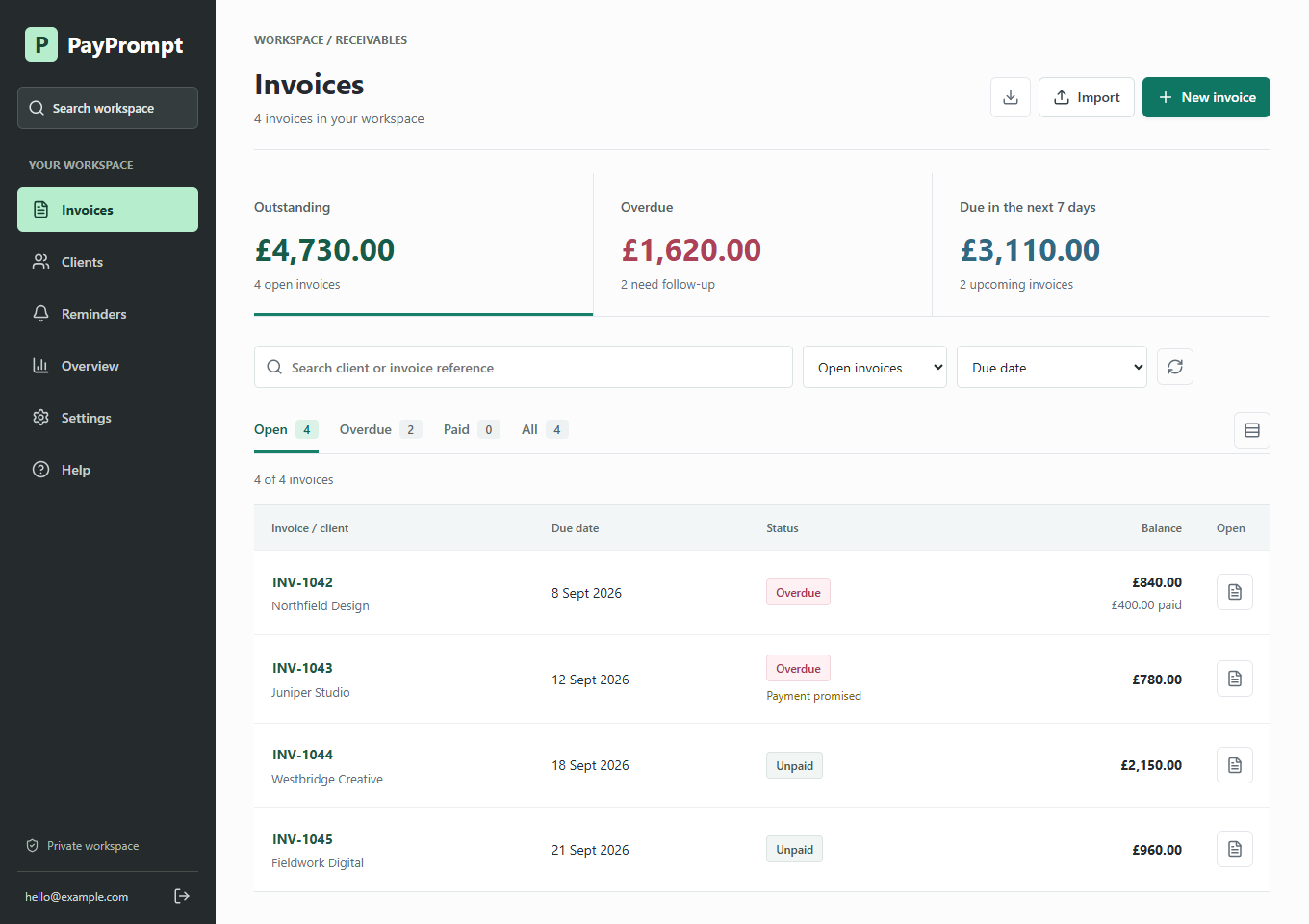
Add invoices or import a CSV or Excel spreadsheet. Keep clients, due dates and remaining balances in one place.
Send reviewed email reminders, record conversations and track payment promises. Put disputed invoices on hold.
Find overdue balances and missed promises, record partial payments and prepare clear client statements.
PAYPROMPT MONTHLY
GBP · Including applicable tax
Start your subscriptionRenews monthly until cancelled. Cancel in Settings → Manage billing; access continues until your paid period ends.
Your workflow: import or add invoices, record payments and send reviewed reminders directly from PayPrompt or your email app. Scheduled email sending and bank/accounting sync are not included in this plan.
A FEW USEFUL ANSWERS
No. PayPrompt focuses on invoice tracking and collection follow-ups. It does not replace bookkeeping, tax returns, bank reconciliation or professional accounting advice.
No. Record payments manually and check the latest balance before contacting a client. Invoices can be added individually or imported from spreadsheets.
Prepare a reminder in PayPrompt, review the recipient and balance, then select Send reminder. Replies go to your sign-in email. Delivery results appear on the invoice. You can also use your own email app and record a manual reminder. Sending is limited to one email per recipient in 24 hours and 100 per workspace in 24 hours. Scheduled sending is not included.
Open PayPrompt, sign in with your ChatGPT account, then choose Subscribe for £12/month in Settings. You confirm payment on Stripe's checkout page. Signing in alone does not charge you. After payment confirmation, save your business profile and add or import your invoices.
Cancel future renewals in Settings → Manage billing. Your access continues until the paid period ends. Afterwards your workspace becomes read-only, with existing records and exports still accessible. Cancellation does not delete your data.
Sign in at app.payprompt.pro with the same account each time. This public website contains product information and sample screenshots, not your customer records.
SUPPORT
Questions about your account, a payment or the £12 monthly plan?
Contact Will directly.
PayPrompt is operated by Will Straker, a sole trader.
Business contact address
Will Straker, trading as PayPrompt
1 Queens Road
Harrogate
HG2 0HE
PayPrompt is operated by Will Straker. Send privacy and data requests to will.straker@icloud.com.
The app receives your sign-in identifier and email through ChatGPT sign-in. It stores the business profile, client details, invoices, payments, notes and reminder records you enter so it can provide your workspace. Invoice records are associated with your signed-in account. Only upload client information you are authorised to process.
OpenAI Sites hosts the website and app; the app uses its Cloudflare-backed database. Stripe handles subscription checkout, billing information and payment events. PayPrompt stores Stripe customer and subscription identifiers and status, not your full card number. Resend processes recipient email addresses, reminder contents and reply-to addresses to send the emails you confirm. Delivery events update your workspace history; no email-open or click tracking is enabled. Support emails are received through the published iCloud address. Hosting and authentication services may process technical information such as IP addresses and use cookies needed to deliver and secure their services.
No advertising or marketing analytics have been added to the website. The app can store display preferences in your browser. You can download your workspace records in Settings, including after subscription access expires. Cancellation stops future renewals but does not automatically erase records. Contact support to request access, correction or deletion; necessary billing or legal records may need to be retained. Do not send passwords or full payment-card details in support emails.
PayPrompt is operated by Will Straker, trading as PayPrompt. Contact: will.straker@icloud.com. The service is intended for freelancers and businesses managing their own client invoices.
The monthly subscription is £12 in pounds sterling, including applicable tax, and renews monthly until cancelled. Review the payment and merchant information shown by Stripe before confirming your purchase. Signing in, browsing or sending an enquiry does not create a paid subscription.
Your subscription includes the invoice tracking, import, reporting and reviewed email follow-up features listed above. Scheduled sending and bank/accounting sync are not included. Keep your balances accurate and check recipients before sending reminders. Send only legitimate reminders about your own invoices, not marketing or unsolicited bulk email. Sending limits and delivery safeguards apply. Upload only information you are authorised to use; do not upload passwords or full payment-card details. PayPrompt does not guarantee invoice recovery or provide accounting, tax or legal advice.
Access to editing requires a confirmed active subscription. Existing records and exports remain available in read-only mode after paid access expires. Use the same ChatGPT account to return to your workspace. For account, data or service issues, contact support. This information does not limit any rights that cannot lawfully be excluded.
To stop future renewals, open Settings → Manage billing and cancel your subscription. Keep the cancellation confirmation. Access continues until the end of your paid period; the billing portal shows your subscription dates.
Stopping renewals does not itself issue a refund. For a refund request, an incorrect charge or a service problem, email will.straker@icloud.com with your account email, the date and amount. Never include your full card number. Refund requests will be considered under applicable rights and the payment provider's terms. No additional money-back guarantee is advertised.
Cancelling does not delete your records. Download your data in Settings and contact support for a deletion request. Any applicable statutory rights remain unaffected.